





Know What Your Applications Cost. Know What They Support. Know What to Change.

See Which Applications Matter and Why
An application inventory tells you what you have. QualiWare helps you understand what each application means to the business.
Connect applications to the capabilities and processes they support, the information they use, the technologies they depend on, their costs and risks, and the people responsible for them.
That context helps you see which applications support your most important capabilities, where you're paying for overlapping functionality, which systems carry the highest costs or risks, and where modernization or retirement may be needed.
Instead of evaluating applications in isolation, you can make portfolio decisions based on what the organization actually depends on, and understand what else could be affected when you make a change.
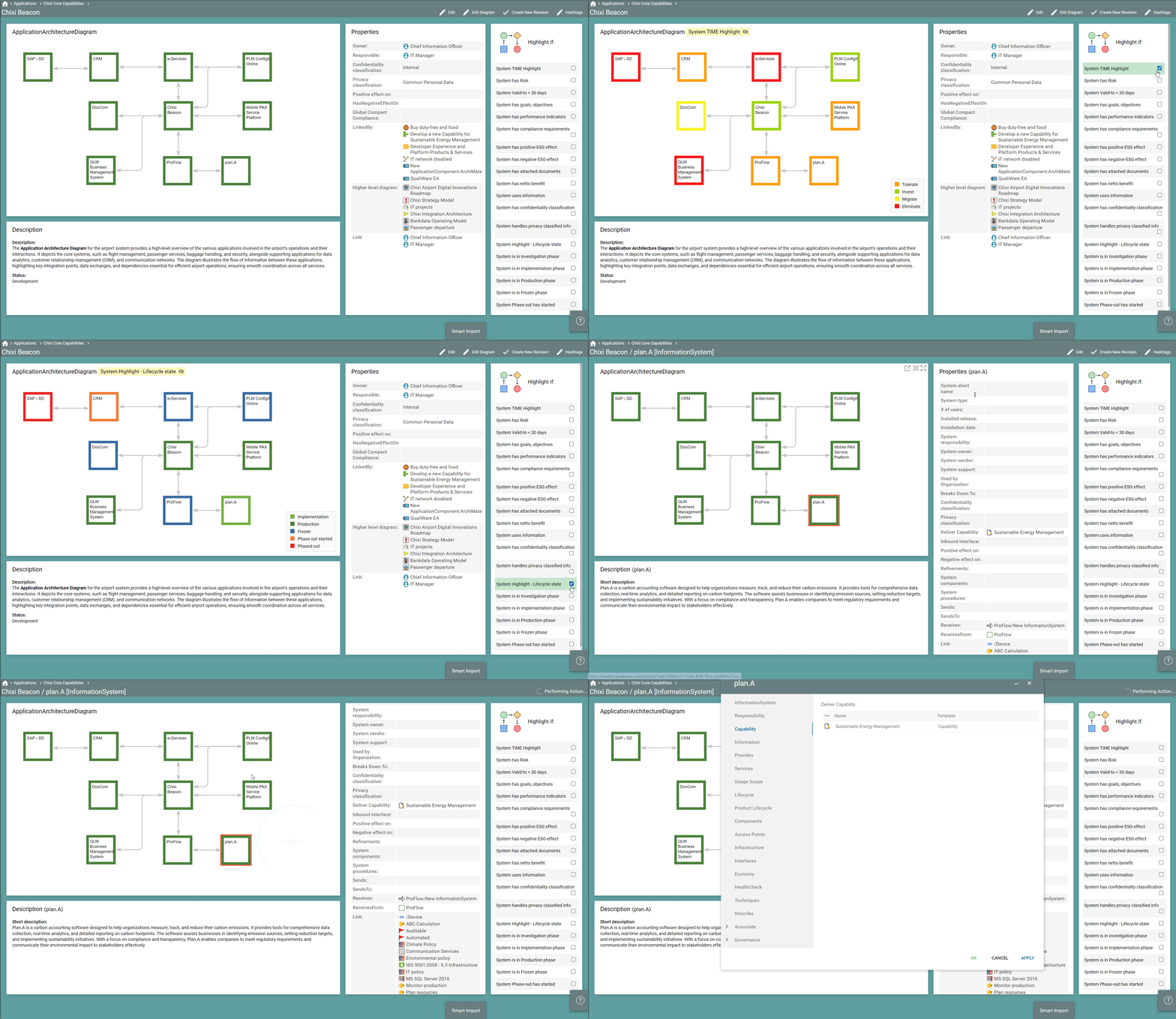
The Application Portfolio Management (APM) desktop in QualiWare
Know Where Your Application Spend Creates Value
Not every application deserves the same level of investment. Some support critical business capabilities. Others overlap with systems you already have, cost more to maintain than the value they provide, or no longer support where the business is going.
QualiWare connects application costs with business value, strategic importance, lifecycle, risk, and the capabilities and processes each application supports. That gives you a stronger basis for deciding where continued investment makes sense, and where consolidation, modernization, replacement, or retirement could reduce unnecessary spend.
Instead of looking for savings across the portfolio as a whole, you can see where money is being spent, what the organization gets in return, and what the consequences would be of changing that investment.
Plan Application Change with the Dependencies in View
Retiring or replacing an application rarely affects only that application. Processes may depend on it, information may flow through it, other systems may integrate with it, and business capabilities may rely on it every day.
Because QualiWare connects these relationships, you can see what will be affected before you make a change and use that context to plan consolidation, modernization, migration, and retirement.
This makes it easier to build realistic roadmaps based not only on which applications should change, but on what needs to happen around them for that change to succeed.
Build on Your APM Work. Don't Start Again
Application Portfolio Management in QualiWare is part of the same enterprise model as your capabilities, processes, information, technologies, risks, compliance requirements, projects, and strategy.
That means the knowledge you build for APM can be reused across Enterprise Architecture, transformation planning, risk and compliance, AI initiatives, and other business priorities. An application documented once can provide context wherever that application matters.
As your needs grow, you build on enterprise knowledge you already have instead of creating another disconnected inventory for the next initiative.
Customer Story
How APM Grew Beyond IT at Coop
Coop began using QualiWare to gain a clearer view of its application landscape. Today, the platform is used across IT, Finance, and other parts of the organization to manage systems, support audits, and maintain compliance with requirements such as GDPR and ESG.
Different teams maintain the information they are responsible for, turning what began as an IT initiative into shared enterprise knowledge that supports decisions across the organization.

See Application Portfolio Management in Action
See how QualiWare helps you understand your application landscape, assess applications in business context, and use that knowledge to make decisions about investment, modernization, consolidation, and retirement.
More APM Ressources
Free APM Whitepaper

Dive deeper into APM
Explore our full APM use case to see how QualiWare helps you create overviews, assess risk and value, and drive strategic decisions across your application landscape. ->
GARTNER REPORTS
Explore the latest Gartner research relevant to Enterprise Architects. Get it here ->


See QualiWare APM in Action
Request a personalized demo to see how QualiWare connects your applications to capabilities, processes, technologies, costs, risks, and strategic priorities.
We'll show you how to assess your portfolio, understand where application spend creates value, identify opportunities to consolidate or modernize, and make better-informed decisions about what to change.
